SaaS spend management features: inventory, seats and renewals
StackKite is SaaS spend management software for software owners, finance and operations teams. Each section below says what a feature does, what data it stores and how it looks in practice.
SaaS inventory
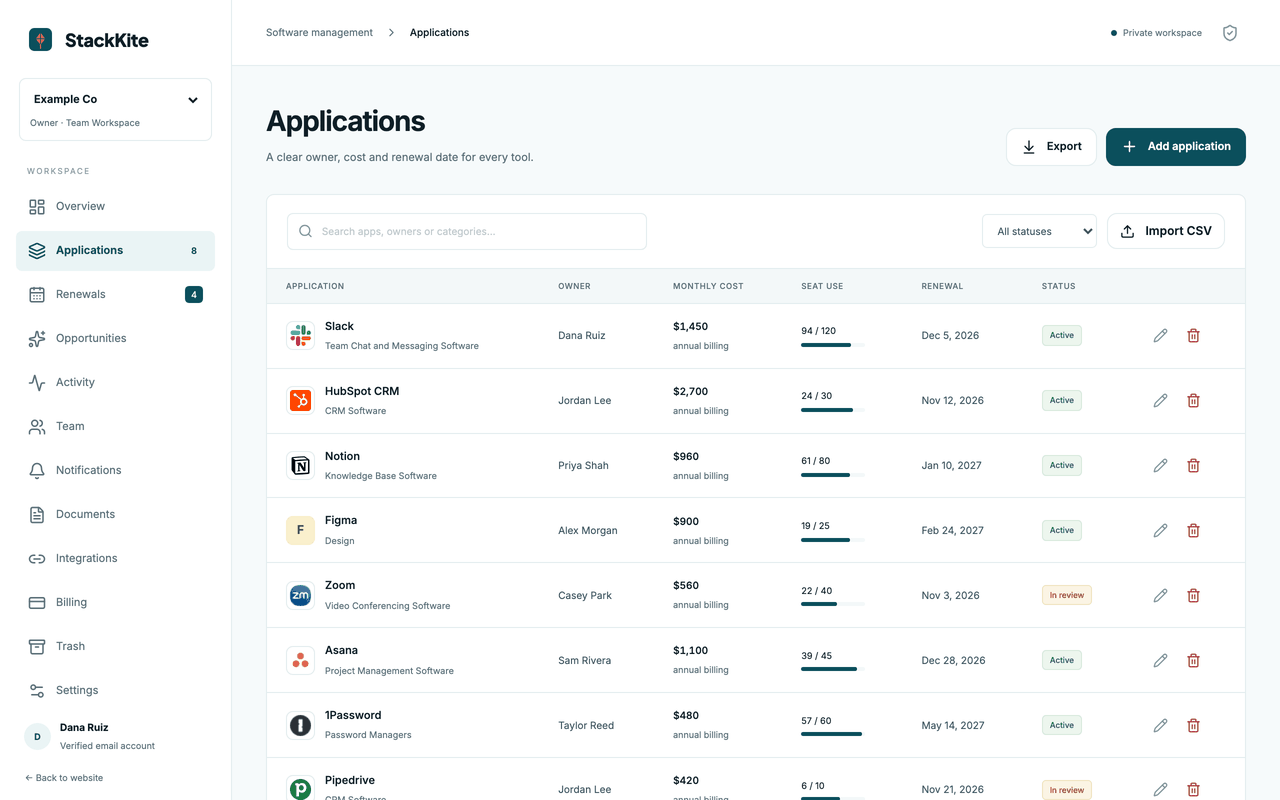
Every subscription your company pays for gets one record. You add it by hand or import a CSV, and the list stays searchable by owner, category and status. Archived records can be restored, so nothing disappears by accident.
Data it stores or shows: Application name, category, owner, billing cycle, monthly or annual cost, purchased seats, active seats, renewal date, notice period in days, status and notes.
Example: Add the design suite with an owner in marketing, 40 purchased seats, 26 active seats, an annual bill and a renewal date in March. It now shows up in spend totals and in the renewal list.
Built-in software catalog
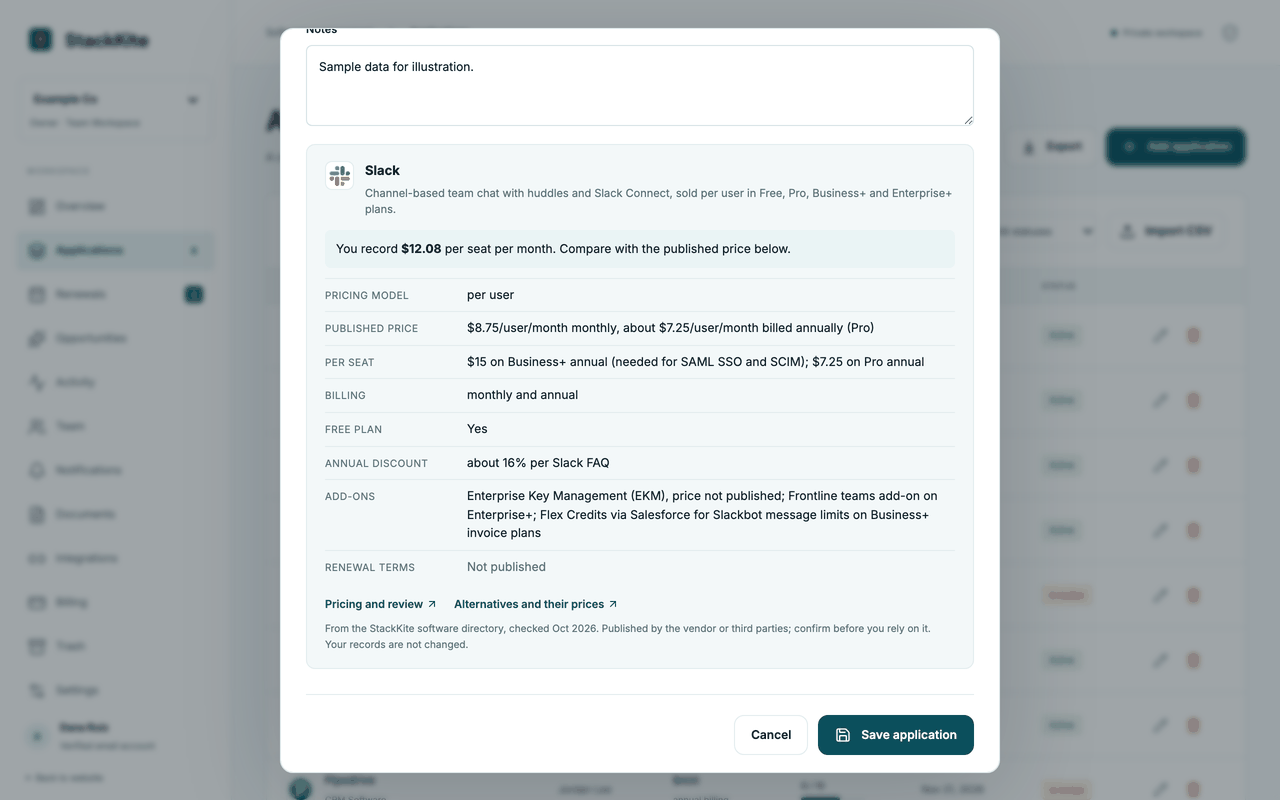
When you pick a tool from the catalog, the record gets its logo and a link to the matching page in the StackKite software directory. The directory facts are shown beside your own numbers and never replace them. If a tool is not in the catalog, you can still add it as a custom entry.
Data it stores or shows: A reference to the catalog entry, plus the published prices and alternatives that the directory lists for that tool. The cost you record stays exactly as you typed it.
Example: You record the CRM at $1,200 per month. The detail view shows the vendor’s published plan prices next to that number and lists cheaper alternatives from the directory.
Spend and seat review
StackKite adds up the costs your team recorded and shows annualized spend by category. It compares purchased seats with active seats and estimates what the idle seats cost. The result is a list of places to look at, not a promise of savings.
Data it stores or shows: Calculated values only: annualized spend, spend by category and estimated unused-seat cost. They are derived from your entries and are not stored as separate records.
Example: A tool with 40 purchased and 26 active seats at $30 per seat per month shows 14 idle seats and an estimated $5,040 per year to review.
Renewal decisions
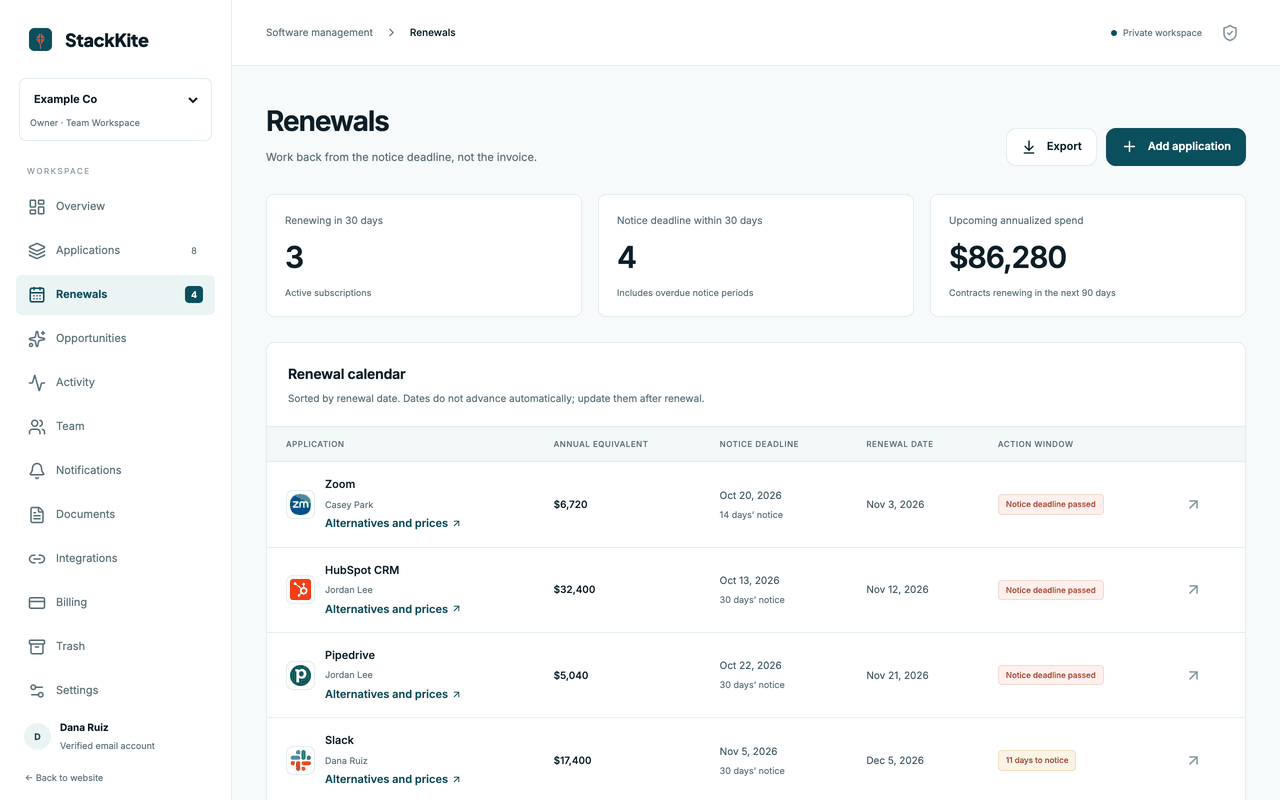
Each application has a renewal date and a notice period, so StackKite can show the date by which you must act, not only the date the contract renews. Owners record a decision and a status, and reminders appear in the app when a deadline gets close. Email reminders are available when an email provider is configured for the workspace.
Data it stores or shows: Renewal date, notice period, status, the decision text, in-app notifications and the delivery status of reminder emails.
Example: A contract renews on March 31 with 30 days of notice. The renewals view shows March 1 as the last day to cancel and flags it as soon as it is near.
A private team workspace
A workspace belongs to your company and is invisible to everyone you do not invite. Owners, admins, members, reviewers and viewers get different permissions, and the server enforces them on every request. You can transfer ownership and remove people at any time.
Data it stores or shows: Members with their email address and role, invitations that expire after seven days, and the workspace owner.
Example: Invite the finance lead as a viewer so she can read and export spend, while IT owners edit their own applications.
Documents and audit history
Attach the contract, the order form or an email to the application it belongs to. Comments and changes are logged with the person who made them. If two people edit the same record, the second save is stopped instead of silently overwriting the first.
Data it stores or shows: Uploaded files up to 10 MB each, comments, and an activity log with actor and time for each change.
Example: Upload the signed renewal PDF to the CRM record and leave a comment explaining why the seat count was reduced.
Exports and MCP
Download your inventory as CSV or a full JSON backup whenever you want. If you use an AI assistant that supports MCP, you can create a read-only key for one workspace, set its expiry and revoke it at any time. The key never exposes other workspaces.
Data it stores or shows: Export files are generated on request. MCP keys are stored as hashes together with their expiry and last-use time.
Example: Create a key that expires in 30 days, connect your assistant and ask it which renewals fall in the next quarter.
Know the scope before you subscribe
Data comes from your entries and CSV imports. Recognized tools show their logo, published prices and links to cheaper alternatives from the StackKite software directory as a reference; your recorded costs stay as you entered them. StackKite does not automatically discover SaaS usage, connect to your bank or cancel vendor contracts. Email reminders require a configured email provider. MCP reads authorized records; it does not silently change contracts.